SSL/TLS connection error: causes, fixes, and how to monitor for it
NET::ERR_CERT_AUTHORITY_INVALID, NET::ERR_CERT_DATE_INVALID, NET::ERR_CERT_COMMON_NAME_INVALID, and ERR_SSL_PROTOCOL_ERROR are different failures — but all of them mean the browser refused to trust the connection before a single byte of the page loaded.
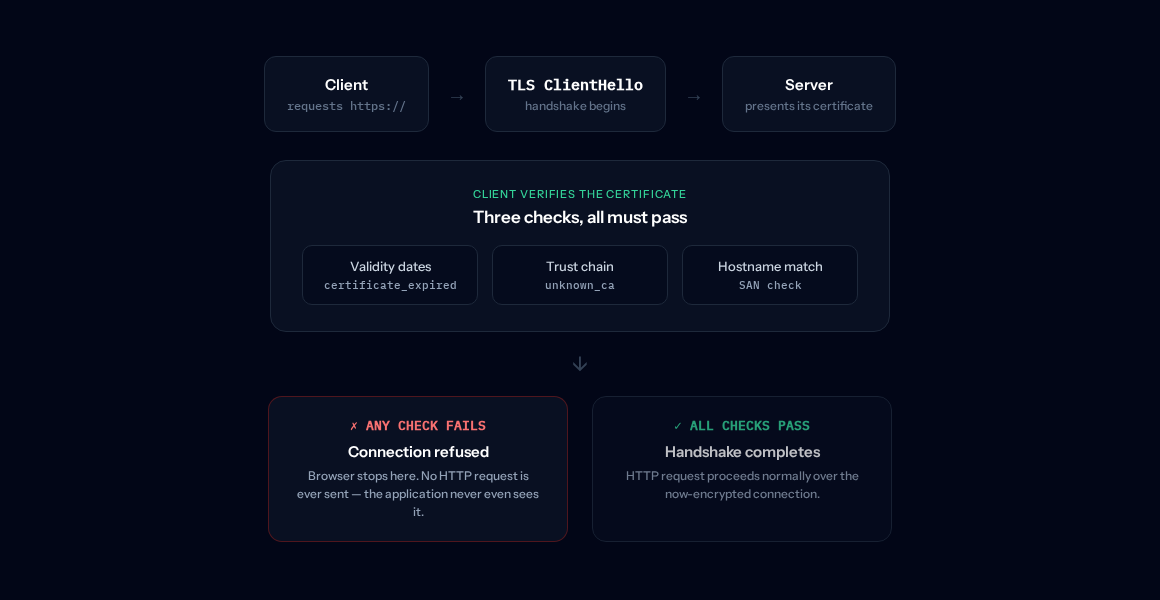
Before your browser can send an HTTP request over HTTPS, it has to complete a TLS handshake — negotiate
encryption parameters with the server and verify the certificate the server presents. If either step
fails, the browser refuses the connection outright; no request ever reaches the application, and no
response is ever generated by it. TLS 1.3 defines a specific alert for each way this can fail. Per
RFC 8446 §6.2, a certificate_expired
alert means "a certificate has expired or is not currently valid," while
unknown_ca means "a
valid certificate chain or partial chain was received, but the certificate was not accepted because the
CA certificate could not be located or could not be matched with a known trust anchor." Different
problems, same outcome: the browser stops before HTTP even starts.
This is overwhelmingly the site's problem, not yours — a lapsed renewal, a self-signed certificate never meant for public visitors, or a certificate that doesn't cover the hostname being requested. There's rarely anything to fix on the visitor's end beyond confirming the date/time on your own device is correct (a clock far enough in the future or past can itself trigger a certificate_expired-style failure against a perfectly valid certificate).
Three different mechanisms, one refused connection
Each fails at a different point in certificate verification, so "check the SSL" isn't specific enough to fix any of them.
Expired certificate
The certificate itself is fine, but its validity window has passed. Almost always a lapsed or failed renewal — automation that stopped running without anyone noticing.
Untrusted issuer
Still within its validity window, but signed by a CA your browser's trust store doesn't recognize — typically self-signed, or an internal CA never meant for public traffic.
Negotiation failure
The certificate may be completely valid, but the client and server couldn't agree on a TLS version or cipher suite at all — an outdated server, or a client too old to speak the server's minimum version.
A fourth case — a hostname mismatch, where the certificate is unexpired and fully trusted but simply wasn't issued to cover the domain being requested — is checked by the client itself against the certificate's Subject Alternative Names, separately from the trust-chain verification above. Common right after a domain migration, or a wildcard certificate that doesn't cover a newer subdomain.
Diagnosing an SSL/TLS connection error
-
1
Check the actual expiry date and chain, not just "is HTTPS working." A browser padlock loading fine an hour ago tells you nothing about a certificate 20 minutes from expiry, or a chain that's about to change.
-
2
Confirm the certificate actually covers the hostname being requested. Check its Subject Alternative Names against the exact domain in the browser's address bar — a wildcard covering
*.example.comdoes not coverexample.comitself. -
3
Verify renewal automation actually ran, not just that it's scheduled. A cron job or ACME client that's silently been failing for weeks looks identical to a healthy one until the old certificate finally expires.
-
4
If it's a handshake_failure specifically, check TLS version and cipher support on both ends — a server that only offers deprecated protocol versions, or a load balancer terminating TLS with a stale configuration, can fail to negotiate with modern clients even with a perfectly valid certificate.
echo | openssl s_client -connect example.com:443 -servername example.com 2>/dev/null \
  | openssl x509 -noout -dates -subject -issuer
Shows the actual notBefore/notAfter dates, the subject (including SANs, with -text instead of -dates), and the issuing CA — the same three things a browser checks before deciding whether to trust the connection at all.
Two different things happen here, and it's worth being precise about which is which. Live, a TLS handshake failure means an HTTP check never gets a response at all — the same as any other unreachable endpoint, so a status code assertion fails immediately, with no special "SSL" handling required. But that only tells you after it's already broken. The actual preventive feature is separate: dedicated certificate expiry monitoring performs a real TLS handshake against the host on its own schedule, independent of your regular endpoint checks, and warns you once the certificate crosses a configurable threshold — 14 days by default, adjustable from 1 to 365 — so a lapsed renewal shows up as a warning days in advance, not as this error in front of a customer. It's available on the Pro and Business plans.
Frequently asked questions
Is this the same error every time, or several different ones?
Several different ones, grouped under one page because they share the same layer of the connection. Chrome alone reports NET::ERR_CERT_DATE_INVALID (expired), NET::ERR_CERT_AUTHORITY_INVALID (untrusted issuer), NET::ERR_CERT_COMMON_NAME_INVALID (hostname mismatch), and ERR_SSL_PROTOCOL_ERROR (the handshake itself failed) as distinct codes — Firefox and Safari use their own names for the same underlying failures. The fix is different for each, so the code matters.
Is an expired certificate the site's fault?
Almost always, yes — unlike a DNS typo or a client-side network issue, a certificate has an expiry date the site operator set (or their renewal automation failed to update), and TLS 1.3 has a specific alert for exactly this case, certificate_expired. There's essentially nothing a visitor can do about it except wait for the site to renew.
What's the difference between an untrusted certificate and an expired one?
An expired certificate was valid once and its expiry date has simply passed. An untrusted one (NET::ERR_CERT_AUTHORITY_INVALID) might still be within its validity window but was issued by a CA your browser doesn't recognize — commonly a self-signed certificate, an internal/private CA never added to the system trust store, or occasionally a real misconfiguration in the certificate chain the server sends. RFC 8446 calls this unknown_ca: the chain was received, but the root couldn't be matched to a trust anchor the client already has.
Can a hostname mismatch happen with a perfectly valid certificate?
Yes — this is arguably the most confusing case, because the certificate itself can be unexpired and issued by a fully trusted CA, and it still fails, because it simply wasn't issued to cover the hostname being requested. This is common right after a domain migration, a wildcard cert that doesn't cover a new subdomain, or a load balancer accidentally serving one service's certificate for another's hostname.
Does HeimPulse have a dedicated SSL handshake alert?
For a live check, no special handling is needed — a TLS handshake failure means the HTTP request never got a response at all, so a status code assertion fails the same way it would for any other unreachable endpoint. What HeimPulse does have as a dedicated feature is proactive certificate expiry monitoring: a real TLS handshake against the host on a schedule, warning you before the certificate crosses a configurable threshold (14 days by default) — so you find out ahead of the expiry, not from this error. It's on the Pro and Business plans.
SSL certificate expiration alerts → · Full uptime monitoring feature → · All error explainers →
Get warned before the certificate expires, not after.
Free plan, no credit card, set up in a few minutes.